
Recommended approach (default)
For most venues, the safest setup is:
- Primary = POS
- Backup method (Secondary) = none
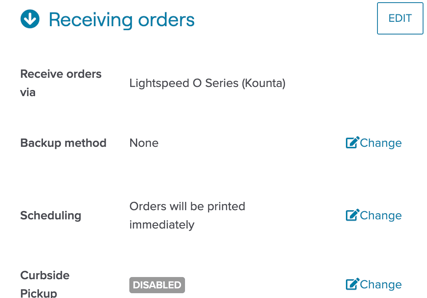
This keeps order success/failure simple:
- POS succeeds → order succeeds
- POS fails → order fails (guest sees failure)
What “Backup method” actually does (important)
In MOBI today, Backup method is not true failover. It does not mean:
“If POS fails, try Backup.”
Instead, Backup is an additional dispatch path, and some Backup methods can become critical to acceptance.
Only use a Backup method if you really need it
Use Backup only when there’s a clear reason (e.g., temporary mitigation during rollout) and the venue understands the operational impact.
Key warning: “no-fail” backup methods can break orders if they go offline
If the Backup method is one of these “no-fail” types:
- Printer
- Email Dispatch
- Orders for Windows (O4W)
- No Dispatcher
Then it must be treated as mission-critical:
- If that backup method is offline, orders can fail immediately
- MOBI may not fall back to the POS even if the POS could have accepted the order
- The venue must actively monitor the backup channel
Before enabling Backup, confirm:
- The venue does not expect “backup = fallback”
- Who will monitor the backup method (and how)
- What the plan is if the POS dispatch fails but the order is accepted through the backup channel