
The MOBI Admin app is in Beta, and is now available for everyone! Please share your feedback via the Feedback button, or help@mobihq.com
The MOBI Admin app gives your store team a simple, mobile-friendly way to manage key MOBI operations while they are on the floor.
It is designed for busy service environments where managers and staff need quick access to the information and actions that matter most - without needing to sit at a desktop or navigate through the full MOBI Admin experience.
What the app is for
The MOBI Admin App is built to help venue teams:
- Check what is happening in store during service
- View order activity via the new MOBI Order Manager
- Manage store settings and status quickly
- Update stock within a few taps
- Use important MOBI tools from a phone or tablet
It is not intended to replace the full desktop MOBI Admin experience. Desktop Admin is still the right place for more detailed setup, configuration, reporting and menu management.
Think of the MOBI Admin App as Admin-on-the-go for stores.
How to access the app
The MOBI Admin App is available from the App Store and Google Play Store.
- iOS: Download from the App Store
- Android: Download from Google Play
Once installed, log in using your MOBI credentials.
Key features
Login and location selection
You can log in using your existing MOBI credentials.
If you have access to more than one store or head office, you’ll be able to choose which location you want to view. You can also switch locations from inside the app.
Home screen
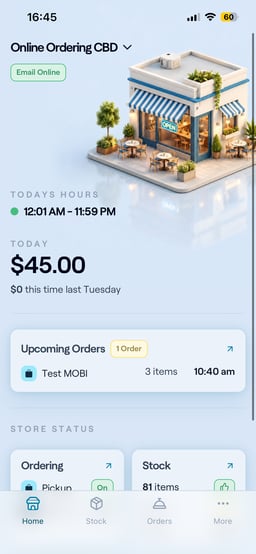
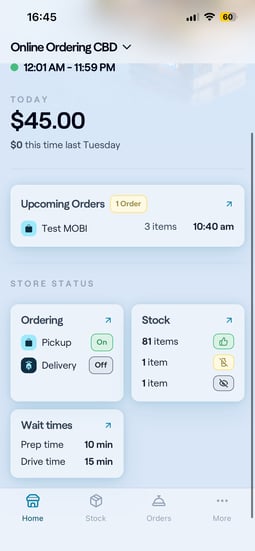
The Home screen gives you a quick view of what matters right now for the selected location.
It may includes information such as:
- POS status
- Store opening hours
- Today’s sales
- Upcoming orders
- MOBI storefront status
- Aggregator status
- Stock status
- Wait times
Order Manager
Order Manager is available inside the MOBI Admin App.
It gives stores a real-time view of orders, including successful, pending and failed dispatch states where available. Over time, Order Manager is expected to become more actionable, with notifications and more operational workflows.
Read more about the Order Manager here: https://help.mobihq.com/introducing-mobi-order-manager
Store status controls
The app includes quick access to high-impact store controls, such as:
- Turning ordering on or off
- Adjusting wait times
- Adjusting order limits, where enabled
These controls are designed for moments when staff need to respond quickly during service.
Stock management
The app makes it easier to manage stock from a mobile or tablet device.
You can use it to:
- Mark items in or out of stock
- Update stock quickly
- Apply stock changes in bulk
Sales
An updated version of the Sales page is available in the app. We are still working to optimise this page, and it will be available in full Admin soon.
Opening hours
The app includes access to opening hours, with a mobile-friendly experience.
More tab
The More tab gives access to additional settings and tools that are not shown in the main navigation.
Depending on your permissions, this may include options such as:
- Appearance settings
- My Locations
- Additional account or support tools
What’s coming next
The first version is focused on giving restaurant staff a simpler way to access key operational workflows from a phone or tablet.
Future improvements may include:
- Push notifications for important order or store events
- An in-app notification centre
- Clearer failed-order reasons and troubleshooting guidance
- More actionable Order Manager workflows
- Additional store controls
- Support chat
- Additional insights and recommendations
Some of these areas are still being explored, so not every item listed above is guaranteed to be released. Your feedback will help us decide what matters most.
We’d love your feedback
We’re continuing to improve the MOBI Admin App and would love to hear how it fits into your store operations.
As you try the app, please tell us:
- Which features are most useful during service?
- What information do you need to see first when you open the app?
- Which information or actions are missing?
- What notifications would be helpful?
- Are there any workflows you still need to complete in desktop Admin that would be useful in the app?
Your feedback will help shape future iterations and ensure the app supports the way your team actually works day to day.
For help, feedback or suggestions, please email help@mobihq.com, or fill out this form.