
MOBI Delivery lets you offer delivery to guests using third‑party couriers, without needing to set up or manage a separate delivery provider. Get set up in one click!
Let MOBI arrange the drivers, the delivery fees and all the fluff, and you can stay focused on providing delicious meals to your growing customer base!
Why choose MOBI Delivery
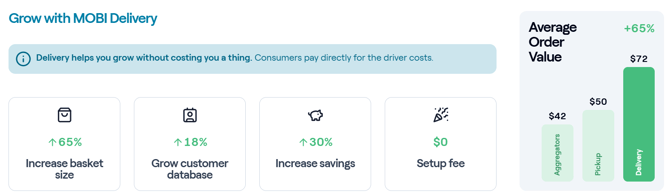
Customers want convenience, and aggregators cost a lot of money. Offer delivery to your customers without the extra cost and time to set up with a delivery provider.
- Fast enablement with minimal configuration
- No delivery provider onboarding and no separate delivery contracts
- No driver or fleet management for your teams
- No setup fee to enable delivery through MOBI
- Delivery offered alongside pickup on your existing MOBI storefront
How it works
Guest experience (what customers see)
Delivery will appear as a fulfillment option on your MOBI storefront.
Key details:
- The delivery fee is shown in the basket and at checkout.
- The fee is quoted before payment.
- The delivery fee may change if the guest updates the delivery address or significantly changes the cart.
- Guests will receive delivery updates via SMS.
*Delivery orders must total below $200
How delivery is fulfilled (what happens after checkout)
When a guest places a delivery order:
- MOBI sends the delivery request to a delivery provider.
- The provider assigns a driver.
- The driver picks up the order from your location and delivers it to the guest.
What the restaurant needs to do
The coordination with the underlying delivery provider all happens in the background. Your teams do not need to contact the delivery provider to dispatch drivers.
The delivery provider determines the zone they are able to deliver to, calculates the delivery fee, and will send delivery updates to the guest via SMS.
Fees & payments
What it costs the restaurant
There is no setup fee for MOBI Delivery.
You receive the full order value (food and items), minus your standard MOBI Payments fees, just like a pickup order.
What the guest pays
The guest pays:
- Order value (food and items)
- Plus delivery fee
The delivery fee:
- Is calculated from the delivery provider quote
- Typically varies based on distance and other factors
- Is passed through at cost (no markup by MOBI)
Eligibility
MOBI Delivery is available in:
- New Zealand
- Australia
- Canada
- United States
Some conditions may apply, depending on location.
To enable MOBI Delivery, your store must:
- Use MOBI Payments
Already have an account with Uber Direct or DoorDash Drive?
You likely don't need MOBI Delivery! Enabling MOBI Delivery would replace your existing provider. But if you'd like to know more about how MOBI Delivery differs to the other providers, please contact your MOBI representative, or email help@mobihq.com
Enabling MOBI Delivery
Stores can enable MOBI Delivery in MOBI Admin, Delivery Overview page - https://www.mobi2go.com/admin/store/[Store_ID]/delivery.
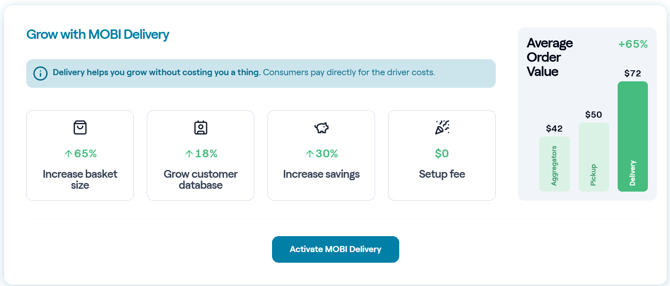
You will need to confirm:
- Delivery hours have been set
- Delivery status (set Delivery to Active)
Once enabled, delivery becomes available to guests on the storefront.
NOTE: If you see "Register Interest" instead of "Activate MOBI Delivery", please submit a request form or contact help@mobihq.com so we can help you with steps to make MOBI Delivery possible.
Disabling MOBI Delivery
You can disable delivery at any time by:
- Setting Delivery to Inactive (temporary), or
- Turning off delivery hours (if you do not plan to offer delivery for a period of time)
POS behavior
Order type
Delivery orders are sent to your POS as pickup orders.
To ensure clarity:
- The order includes a note that it is a delivery order.
- Please prepare and package the order in a way that is suitable for delivery.
Optional: Delivery PLU
If you prefer delivery orders to be reported differently in your POS, you may be able to configure an optional “Delivery PLU” in MOBI Admin (availability depends on POS). Then you can set this Delivery PLU in your Receivng Orders section in MOBI Admin. Your MOBI team can advise on this.
Refunds
Refunds to guests
In the case a refund is required, if you process a full refund, the order amount plus delivery fee will be refunded to the customer.
The order (food) portion will be refunded to the guest from the restaurant's Stripe account.
The delivery fee portion will be refunded from MOBI's Stripe account.
Where relevant, please report the refund reason as "Delivery issue".
Refunds to restaurant
If you believe you were obligated to refund a customer due to a negative delivery experience, and should receive compensation for the cost of the food items, please contact help@mobihq.com within 72 hours of the order. Provide as many details of the order as possible, including Order ID.
Getting help
If you have trouble with a delivery order (driver late, customer didn't receive order), we suggest you first try contacting the driver directly.
Navigate to:
-
Upcoming Orders (https://www.mobi2go.com/admin/store/[store_id]/overview), or
-
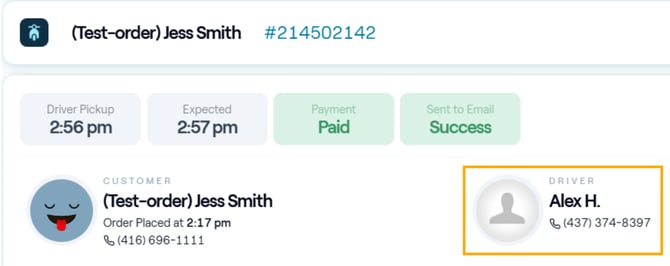
MOBI's new Order Manager (https://www.mobi2go.com/admin/store/[store_id]/order-manager) to see the driver information for live orders.
When a driver is assigned, it will show like this in the Order Manager:
If you are not able to resolve the issue with the driver, please contact help@mobihq.com