
What is Otto Lite?
Otto Lite is an AI-powered phone ordering option available through your MOBI ordering page.
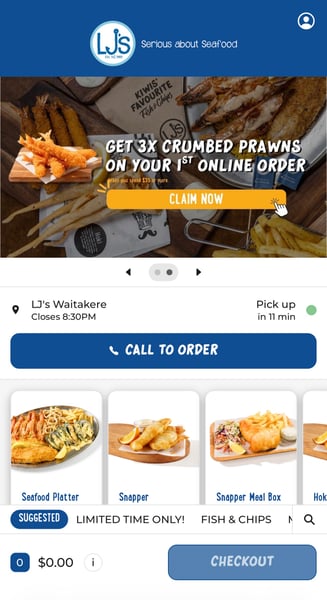
Customers can tap Call to Order and speak with Otto, who can:
- Take a pickup order over the phone
- Answer basic questions, such as opening hours and menu questions
- Send the completed order through to your venue via MOBI
How does it work?
- A customer selects Call to Order from your MOBI ordering page.
- They speak with Otto and place their order.
- Otto sends the order through MOBI.
- Your venue receives and processes the order through your usual MOBI pickup order flow.
There’s no separate ordering system for your team to manage.
How do payments work?
Customers will normally be asked to pay through MOBI when placing an order with Otto Lite. They can also ask to pay when they pick up their order, so some Otto Lite orders may arrive unpaid.
When an Otto Lite order comes through:
- If the order shows as paid: no further payment is required.
- If the order shows as unpaid or payment required: collect payment from the customer when they pick up.
You can check the payment status on the order docket, in MOBI Admin, or in the MOBI app.
If you’re unsure about the payment status of an order, open the order in MOBI Admin to confirm before handing it to the customer.
If you would prefer all Otto Lite pickup orders to be paid before they are submitted, please contact your CSM or the MOBI Customer Care team.
Where can I see Otto Lite orders?
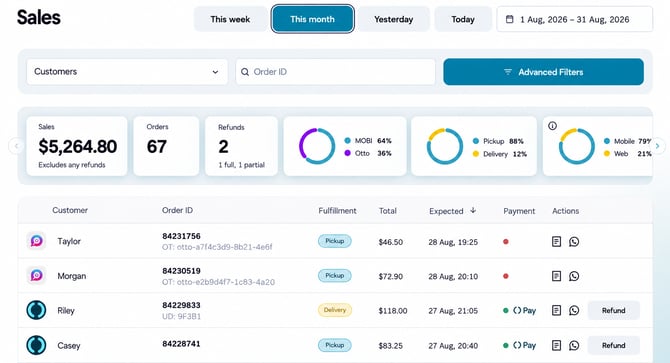
Otto Lite orders appear alongside your other MOBI orders.
You can view them in:
- Orders in the MOBI app
- Sales in MOBI Admin
- Order Manager
Do I need to do anything?
For many venues, no action is required.
If we need anything from you before Otto Lite can be enabled for your location, the MOBI team will contact you directly.
Frequently asked questions
Does Otto Lite replace my existing MOBI online ordering?
No. It simply gives customers another way to place an order. Your existing online ordering remains unchanged.
Is Otto Lite for pickup or delivery orders?
Otto Lite is currently being rolled out for pickup orders.
What can customers ask Otto?
Otto can help customers place an order and answer basic questions relating to your menu, opening hours and ordering.
Can I make changes or ask for Otto Lite to be removed?
Yes. Contact your Customer Success Manager or email help@mobihq.com and our team can help.
Want to learn more?
You can learn more about Otto and how AI phone ordering works at here.
If you have any questions about Otto Lite on your MOBI account, contact your Customer Success Manager or email help@mobihq.com.