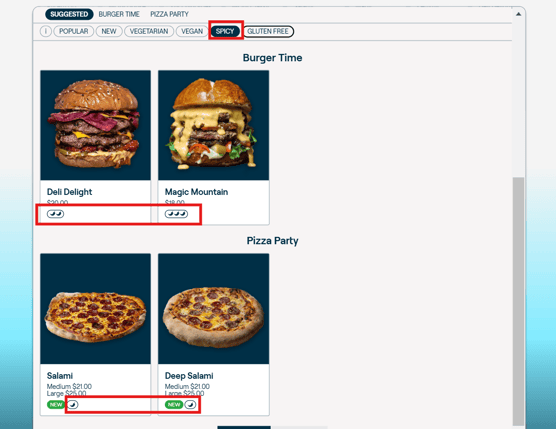
Sometimes the first thing a customer wants to know is whether you have any vegan items on the menu. Others worry about spice levels.
Other times customers are overwhelmed by choice, especially if they're new to your restaurant. They might just want a bit of help to guide them to some of your popular products.
Here are some tags you can use to highlight and filter items on your menu.
Promote items
Feature tag
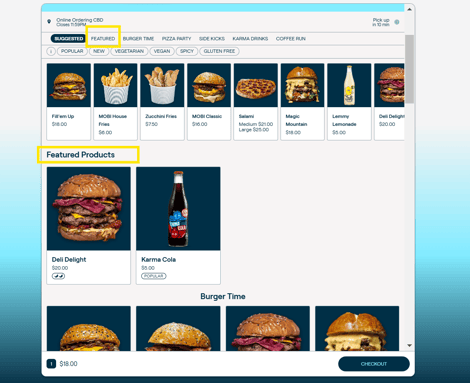
A featured product is a product that is highlighted or showcased on the storefront. It can be used to promote specific products to customers and increase sales.
This works in the way of a new category, i.e. when a product is configured as Featured, a new category is created up the top of the menu.
-
Highlight and showcase specific products on the storefront as a new category
-
Increase visibility and promote sales of featured products
To set it up
-
Access the Menu settings in Admin and choose the product(s) you want to feature.
-
Edit the product by adding the tag:
featured. -
Save the changes and verify that the custom tag is correctly added to the desired product in the menu.
Filter items
Popular tag
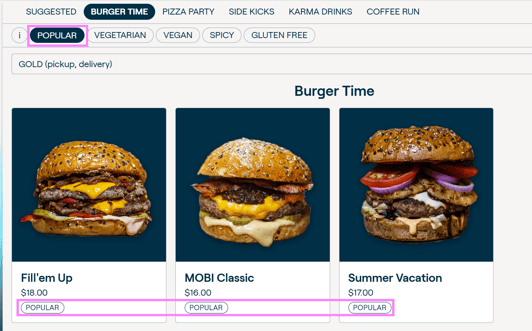
The "popular tag" highlights popular products. This tag works as a filter, so adding this tag to at least one product will create the Popular filter up top, and clicking it will show only items with the tag.
To set it up
-
Open Admin and navigate to the Menu section.
-
Find the product to designate as popular click to edit it
-
Add the
populartag. -
Save the changes, and the popular tag will be assigned to the product.
New tag
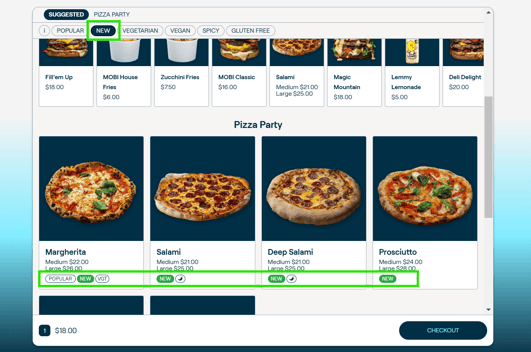
This works in exactly the same way as the popular tag. It has a standard green colour so as to attract customer attention to these items.
Follow all instructions as above, using the new tag.
Note: For any of the featured, popular or new tags, if you'd like the wording changed to something like "Chef's favourite" or "Summer fave", reach out to help@mobihq.com
Dietary tags
We also support a range of dietary tags which can be used to filter your menu. Clicking on a filter like "gluten free" will only show items that have that tag.
The spicy filter has three levels of spiciness, depicted on the storefront with one, two, or three chilies.
Here are the filters and tags we support:
- Vegan -
filter-vegan - Vegetarian -
filter-vege - Gluten free -
filter-gf - Dairy free -
filter-df - Nut free -
filter-nf - Seafood free -
filter-sf - Egg free -
filter-ef - Spicy -
filter-spicy-{n}where {n} represents the level of spiciness 1-3 (e.g. filter-spicy-2)