
Take control of your branded StorefrontStorefront Designer puts the look and feel of your storefront directly in your hands. Updates that were previously managed by MOBI can now be made by your team, whenever you need them. Update your logo, apply your brand colours and custom fonts, and fine-tune details like buttons, card styles, product images and menu layouts. A live preview lets you see changes as you make them, and nothing goes live until you hit save. Head to Storefront > Designer in MOBI Admin to start making your storefront your own. Learn more about Storefront Designer
Watch the video below: |
 |
|
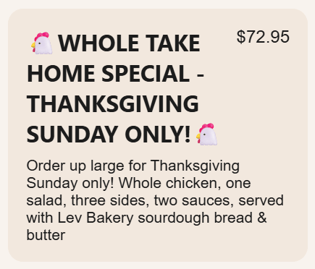
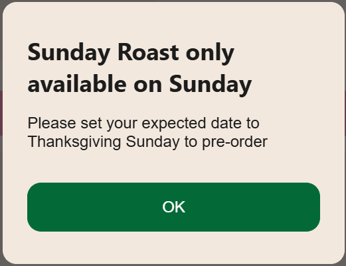
Make special menus available at just the right timePlanning a seasonal menu, limited-time special or one-day promotion? Order Rules give you more control over exactly when customers can order it. Promote your special in advance while setting the product to only be available for collection or delivery on the dates you choose. Set a specific date, a date range, particular days of the week or even certain times, ideal for everything from Thanksgiving and Christmas catering to weekend-only specials.
Customers can still order ahead; MOBI simply checks their chosen collection or delivery time at checkout to make sure it falls within the availability you've set.
Order Rules can be applied to a whole menu, category or individual product. Reach out to Support or your CSM to get one set up.
|
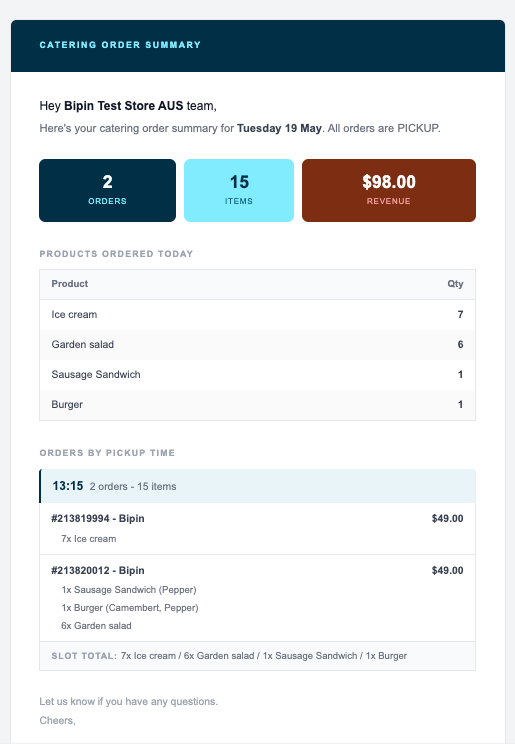
Start the day with a clearer Catering prep planThe new Catering Order Summary Email brings your location's catering orders together in one easy-to-read daily update, helping your team see what's ahead and plan prep accordingly. Get totals for orders, items and revenue, a quantity-sorted list of products to prepare, and a breakdown of orders & products by pickup time. The summary is automatically sent to your location's existing confirmation email recipients, and if there are no upcoming orders, there's no unnecessary email. Ask your CSM or Support to enable Catering Order Summary Emails for your locations. |
 |