
Order confirmation receipts have a 73% open rate compared to marketing emails at around 5-10%.
This makes them one of your highest-engagement customer touchpoints.
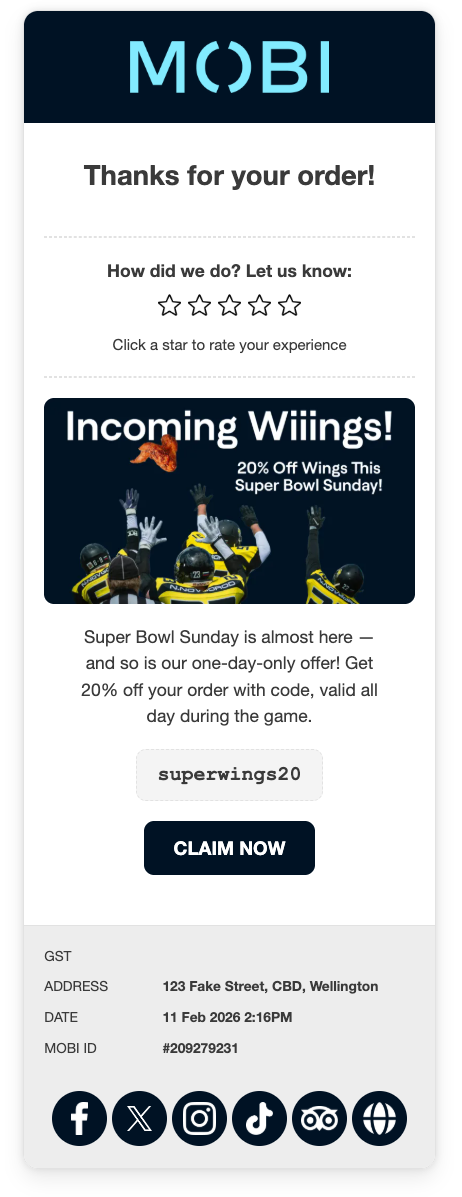
What Is Receipt Customiser?
It allows you to:
-
Add an image or promotional banner
-
Add a message and call-to-action button
-
Attach an action (e.g. apply a voucher)
-
Promote app downloads (available only if you have a MOBI App)
Your logo and brand colours are pulled directly from your Storefront settings, so your receipts stay consistent with your online ordering experience.
Social media links will automatically appear if they’ve been added in:
Settings → General Settings
How to Turn It On
Step 1: Log into MOBI Admin
Access your standard MOBI Admin dashboard.
Step 2: Go to Marketing
Navigate to: Marketing → Receipt Customiser
Step 3: Enable Sections
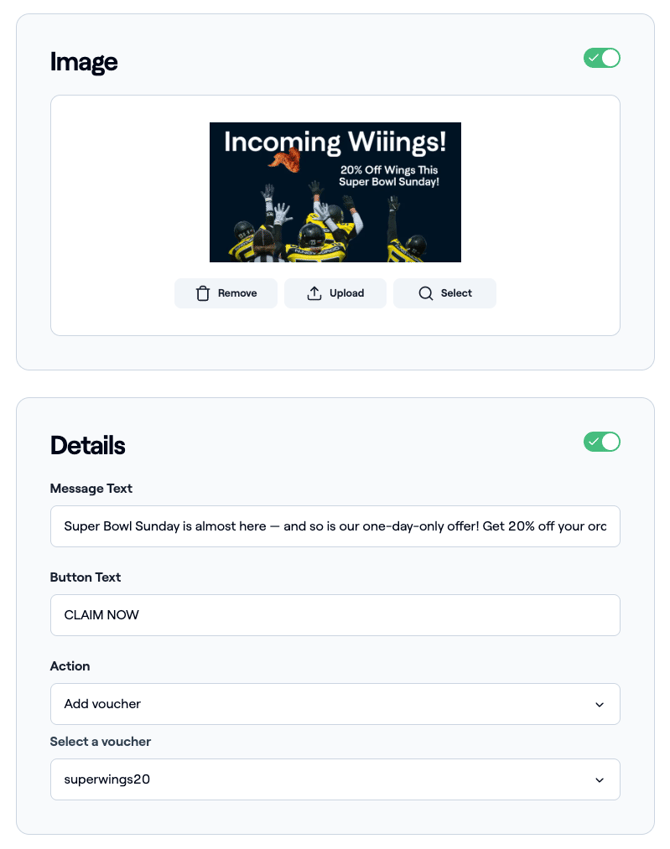
You can toggle on/off:
-
Image
-
Details (Message + Button + Action)
Step 4: Configure Your Content
Image
Upload a custom image.
This can be used for:
-
Seasonal campaigns
-
Limited-time offers
-
App promotion
-
Brand reinforcement
Message Text
Add a short promotional or engagement message.
Button Text
Define your call-to-action (e.g. CLAIM NOW, ORDER AGAIN, DOWNLOAD APP).
Action
Choose what happens when customers click the button.
Example:
Add Voucher → Select a voucher (e.g. superwings20)
This automatically applies the offer when the customer clicks.
Step 5: Click Publish
Once published, the custom receipt will apply to all new online orders.
Using Actions to Drive Repeat Orders
The real power of Receipt Customiser is in the Action functionality.
You’re not just displaying a message — you’re prompting a next step.
Example strategies:
Encourage repeat orders
-
Add a voucher for a second-order discount
-
Promote free delivery on their next purchase
Drive app adoption
-
Direct customers to download your app (available to customers with a MOBI App)
Support campaigns
-
Align receipt content with current marketing promotions
Because customers have just completed an order, this is a high-intent moment — making it ideal for guiding their next action.
Learn more about MOBI Actions.
Best Practice Tips
-
Use one clear call-to-action
-
Keep message text concise
-
Match your image to your current campaign
-
Rotate offers regularly